Connect Claude to Google Workspace
Connect Claude Cowork and Claude Desktop to Google Workspace with the powerful capabilities of Workspace MCP, going far beyond what Claude's built-in connectors offer.
What You Need
You need a Workspace MCP server URL and access to Claude's Connectors settings. For Workspace MCP Cloud, use the MCP address from your welcome email, usually in this format:
https://yoursubdomain.workspacemcp.com/mcpIf you run your own Workspace MCP server, use the public HTTPS MCP
endpoint for that deployment. Claude custom connectors are designed
for hosted remote MCP servers, so you do not need to edit claude_desktop_config.json for this cloud setup.
How to Connect Claude to Google Workspace
- Open Connectors in Claude. Go to Claude Desktop, Claude on the web, or Claude Cowork and open the Connectors area.
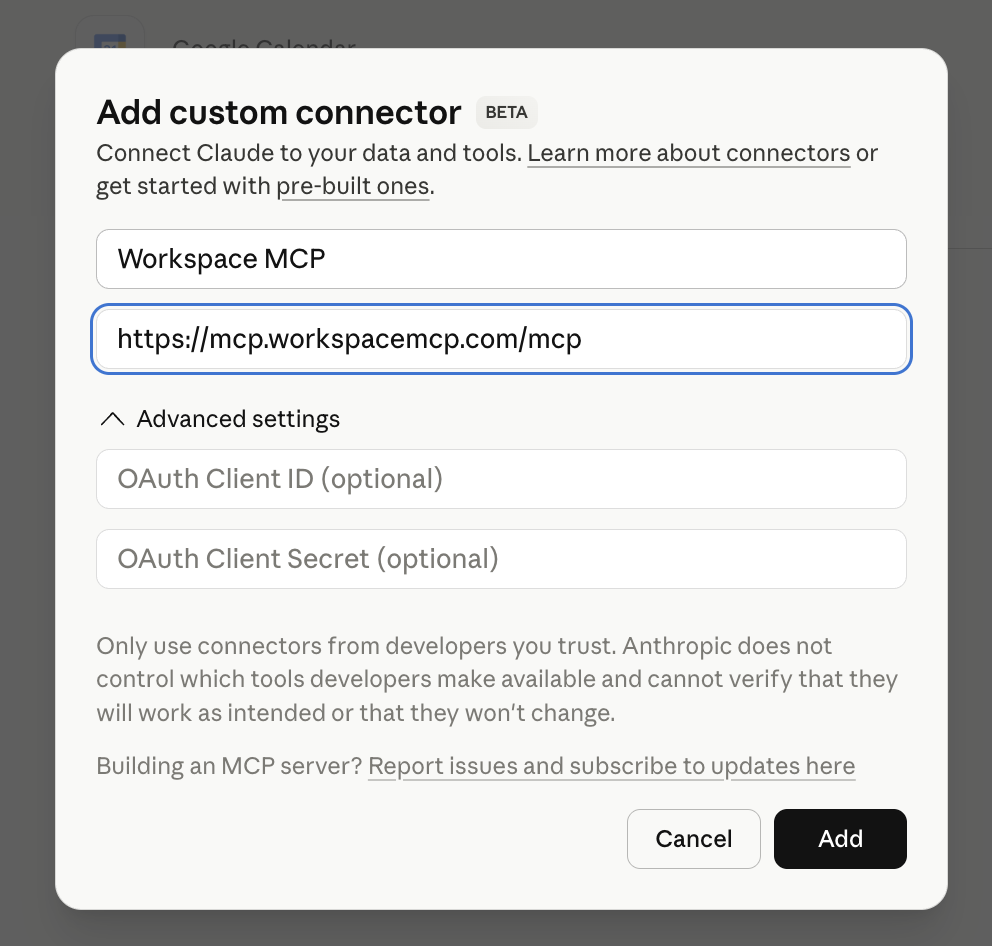
- Choose Add custom connector. This starts Claude's custom MCP connector setup flow.
- Name the connector Workspace MCP. Paste your MCP server URL, such as
https://yoursubdomain.workspacemcp.com/mcp. - Click Add and sign in with Google. Claude will add the connector, then prompt you to configure or authenticate it. Complete the Google OAuth flow with the account you want Claude to use.
Claude Connector Screenshots

Verify It Works
Start a Claude conversation and ask for a small Google Workspace action that matches your enabled tools. For example, ask Claude to list upcoming calendar events, search Drive for a file, or find recent Gmail messages. Claude may ask for confirmation before calling tools or accessing account data.
Each person should authenticate with their own Google account. The connector can only access the Google Workspace data that the signed in user already has permission to access.
Troubleshooting
The connector does not authenticate
Confirm the MCP URL ends in /mcp and uses https://. If you are using Workspace MCP Cloud, copy
the URL directly from your welcome email.
Google shows a redirect_uri_mismatch error
Hosted Workspace MCP deployments need a Google Cloud Web Application OAuth client, not a Desktop client.
The redirect URI should match your hosted domain and end with /oauth2callback.
Claude cannot find the tools you expected
Check the Workspace MCP server configuration. Tool availability can depend on the selected tool tier, enabled services, OAuth scopes, and whether read-only mode is active.